Page Trail: [[ Diego Ongaro > Blog Index ]]

My Brain is Out of Memory

2010-02-06 14:30

I'm not writing enough.

The databases course I'm taking is all about "IOs", the number of disk reads and writes it takes a database system to service a query. In the examples, the data sets are too large to fit in the available memory, so they need to be stored on disks. Disk IOs are extremely slow, however, so the course treats them as the only interesting predictor of performance. But I'm working on a databases project, RAMCloud, that works in a completely different way, and all this talk about disk IOs seems archaic to me.

Still, there is something I can take away from the course. While RAMCloud doesn't have a tiny amount of memory to work with, my brain does. If my brain's memory is running low, despite the performance penalties involved, I need to write thoughts down and store them for later use. Otherwise, I'll forget what I've been thinking about and have to start all over.

In its current form, RAMCloud is an elegant but complex beast. We have a lot of design choices to work out, and we can't just take them one at a time. As I race from thinking about one design concern to the next, I rarely take the time to record my thoughts well enough to easily pick up the discussion later. The next time I come back to a topic, my brain panics, assuming that it's a new problem with no clear solution. Then, thousands of IOs later, I slowly pick up on my old train of thought. It's a waste of time. It's even worse when I interrupt other people and get them freaking out over the same thing, only to re-discover the solution together a few minutes later.

I just read an excerpt from Switch: How to Change Things When Change Is Hard by Chip and Dan Heath, which has two great examples of how costly interruptions can be. In the first, nurses make mistakes with medications because others (surgeons, even) are interrupting them. In the second example, hitting closer to home, software engineers delay their release schedule substantially by interrupting each other. I feel guilty. I've been interrupting my officemates and group members too much, and I think it's hurting everyone.

Here's what I'm going to do

To interrupt someone, I have to knock on an imaginary door. I'm going to make the person inside stop what they're doing, get up, walk to the door, and open it for me. By the time they get back to what they're doing, they will have trouble picking it back up. I need to justify why I'm knocking, and I need to come prepared.

Next, when I'm done with that conversation, or when I'm done with any task, that's a door I'm closing. Someone, maybe me, will eventually come back and open that door. It's my responsibility now to not waste their time later. If there's something they will need to know, it's up to me to write that down while I still remember.

Rice.edu Email Account Deleted

2009-11-29 23:21

Rice has deleted my undergraduate email account, diego.ongaro@rice.edu , since I am no longer a student there. If you tried to send to that address and received a bounce notification, please resend your email to the same username at alumni.rice.edu instead.

Twin Peaks iPhone Panorama

2009-11-07 18:27

I went up to Twin Peaks in San Francisco with Jay a few weeks ago. It was a nice view but kind of a worst-case scenario for a photo: my iPhone camera (VGA), poor lighting as the sun was setting, and stong winds.

That day I took a bunch of overlapping shots with my phone. Then I used the GIMP's automatic white balance correction on each of them. Next I stitched them together with Hugin, and finally I edited the stitched image with the GIMP. The following mediocre image is the result (click for the full 1534x652 image):

panorama

The 1 megapixel result really wasn't worth the time. Even in the thumbnail, it's easy to see that multiple source images are contributing their different colors and brightness levels. Maybe Hugin could correct for more of this with the proper settings, but I haven't taken the time to learn it well enough to know how. Although mine has a slightly larger angle, I think the one on wikipedia still wins.


I also took this suprising shot:

slanted Golden Gate bridge

It turns out the iPhone's cheap camera scans horizontally from top to bottom. As I was in a car moving left, the lines lower on the image were scanned later and appear shifted to the right. Kirk Mastin has an interesting post about this rolling shutter effect and what you can do with it. Jeffrey Erlich also has an awesome album that makes use of this effect.

Xfce Stopwatch Plugin

2009-08-16 22:49 | xfce

I needed an excuse to try Mike's Vala bindings for Xfce, so I created a new little plugin for the panel, the xfce4-stopwatch-plugin.

In the original release announcement on July 28th, I wrote:

This is the first release of the stopwatch panel plugin, which you can use to time yourself on different tasks. It's stable and usable, but quite minimal still.

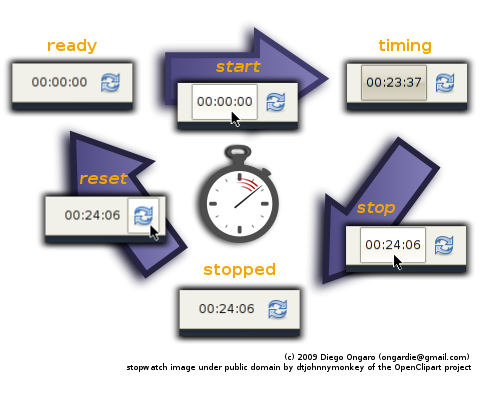
The functionality is best summarized with this image from the web site: screenshots

Vala

From their web site,

Vala is a new programming language that aims to bring modern programming language features to GNOME developers without imposing any additional runtime requirements and without using a different ABI compared to applications and libraries written in C.

Instead of having to write tons of boilerplate code to create new GObjects in C and for other common tasks in developing GTK-based applications, Vala builds these features into the language. The Vala code you write passes through the Vala compiler, which produces GObject-based C code. From there, GCC compiles that to a binary as usual. There is no runtime, so Vala-produced code can run as fast as hand-coded C.

Vala makes it easy to write fast, object-oriented code for GTK-based projects. With Mike's Xfce bindings for Vala, you gain access to Xfce's libraries from Vala, letting you write panel plugins or other Xfce projects in Vala. It's a cool idea and something I definitely wanted to try.

Developing the Stopwatch Plugin

In general, Vala is pretty easy to write if you've worked with GObject before. I did hit a few bugs while developing even this simple plugin, so it's evident that Vala and the Xfce bindings aren't mature yet:

  • I filed GNOME Bug 587150, a bug in Vala's POSIX bindings for the time_t type. Vala treats it as a GObject instead of an integer, making it unusable to pass around your program in many ways. This bug hasn't seen any attention yet, but I've worked around it for Stopwatch by not using time_t.

    Update: Evan Nemerson fixed this one.

  • I patched a small bug in Xfce's Vala bindings for the XfceHVBox widget. The Vala compiler was producing calls to xfce_hv_box_new() instead of xfce_hvbox_new(), which of course caused a problem when GCC tried to resolve the symbol.
  • I also filed GNOME Bug 589930, a bug in Vala's generated code for sscanf. It always added an extra NULL argument at the end of the arguments list. Jürg Billeter fixed this one quickly with this commit, which made it into Vala 0.7.5.

Despite these hurdles, writing the Stopwatch plugin in Vala has been a pleasure. Admittedly the plugin doesn't do much, but the code is very short and straight-forward.

Stopwatch will probably see just one or two more releases before it's feature-complete. I'd also like to port the Places plugin to Vala at some point, but I'm waiting to see how volume management plays out once ThunarVFS is gone.

Lighttpd Fails to Bind to Localhost

2009-08-05 10:21
lighttpd logo

I installed the web server lighttpd on my laptop to test some configuration settings. As I didn't want to expose the server on the network, I uncommented server.bind = "localhost" from /etc/lighttpd/lighttpd.conf.

Then, restarting lighttpd failed with the following error:

(network.c.201)getaddrinfo failed:  Name or service not known ' localhost '

This is lighttpd 1.4.19-5 from main on Debian Lenny.

I was still able to ping localhost and checked my /etc/hosts file, but everything seemed fine. Finally, I checked the line of code the error points to (network.c line 201) and noticed it's part of an IPv6-specific chunk of code.

I found I could work around this issue by disabling IPv6 entirely in /etc/lighttpd/lighttpd.conf. For the uninitiated, comment out this line:

## Use ipv6 only if available.
include_shell "/usr/share/lighttpd/use-ipv6.pl"

Other Reports of This Issue

A couple reports of the same problem can be found on the old lighttpd forums, but no resolution was reached. Unfortunately, I can't reply there because those forums are now locked, and historical threads were not copied to lighttpd's new forums. The first report was from Debian's 1.4.19-1 package, and the second report does not identify the version.

A post on the debian-user-spanish list reports the same problem on Debian Lenny but received no replies.

That mailing list post does point to Debian bug 489063 (which doesn't come up on Google when you search for the error message). There, Pierre Habouzit, one of lighttpd's maintainers on Debian, suggests using server.bind = "::1" instead of server.bind = "localhost" when IPv6 is enabled. This will start up the server without errors, but then I can only access it as http://ip6-localhost/ (not http://localhost/).

Conclusion

This is a pretty annoying little issue, and it hasn't fully been resolved. At a minimum, this:

## bind to localhost only (default: all interfaces)
# server.bind                = "localhost"

should be:

## bind to localhost only (default: all interfaces)
## use ::1 when IPv6 is enabled or localhost for IPv4
## (see Debian bug #489063)
# server.bind                = "::1"
# server.bind                = "localhost"

That would at least point people in the right direction.

I've sunk enough time into this for now, though. I'll post an update here if I pursue this any further.

Chef Roger's Knife List

2009-08-02 12:56 | low-tech

Last semester at Rice, I took the class Cooking with Chef Roger. The man is passionate about his knives, and he gave us a list of brands he recommends. From one of the few scraps of notes that survived, here is Chef Roger Elkhouri's list of quality brands for chef's knives (French knives):

chef's knife

Mid-Range Brands

Top-of-the-Line Brands

Xorg.conf for QEMU/KVM

2009-06-30 22:02

If you want to use a large resolution with a QEMU or KVM virtual machine, you'll need to manually specify a few things in xorg.conf. Out of the box, you can usually only use resolutions up to 800x600, although Fedora and Ubuntu have patched this up to 1024x768.

I created this xorg.conf to work with larger resolutions. With it, I was able to use up to 1280x1024 with the default emulated graphics and up to 1920x1200 when passing the -std-vga option to QEMU or KVM.

To make use of this:

  1. Back up your existing /etc/X11/xorg.conf in your virtual machine, if any.
  2. Save the file to /etc/X11/xorg.conf in your virtual machine:
    sudo wget -O /etc/X11/xorg.conf \
    http://ongardie.net/var/blog/qemu-xorg/xorg.conf
    
  3. If you want to use a resolution other than 1280x1024, modify the Modes line to suit your needs.
  4. Start or restart your virtual machine's X server.

If you're having problems, try passing QEMU/KVM the -std-vga flag.

Cgit Hacking

2009-06-17 11:45
cgit logo

Last week I hacked a couple new features into cgit, a web interface for Git, since it's the one I use on ongardie.net. I added https:// URLs for the Atom feed and also syntax highlighting when viewing files.

HTTPS URLs for Cgit's Atom feed

Cgit generates Atom feeds so that you can keep track of changes from your feed reader. Unfortunately, that requires a full URL, which it assumed started with http://. This obviously didn't work for https://-only installations.

I modified cgit to check the HTTPS CGI variable. If it's set to on, cgit now generates full URLs starting with https://. While this isn't part of the official CGI spec, most servers will set it, including Apache and lighttpd.

Lars Hjemli, the maintainer of cgit, merged in my change, so it should be part of a future cgit release:

This looks good. I've merged it into my wip-branch on http://hjemli.net/git/cgit where I'll let it cook for a little while before merging to my master.

Syntax Highlighting for Cgit

Cgit is useful for browsing around a project's history, but it didn't do syntax highlighting for source code. This made it unpleasant to use for reading complete files (as opposed to diffs).

I modified cgit to make use of the highlight program, when available, to color source code. If highlight is unavailable or fails, cgit falls back to the old black-and-white view.

While the patch is small and self-contained, it's specific to highlight and just tacked on in the source code. Lars didn't take this one:

I like the result, but I think the implementation has to be more generic. And I'm currently about to add support for a few plugins/hooks to cgit which I think can be used to achieve the same result so lets see how that works out first, ok?

I'll be working with Lars on getting a cleaner solution merged into his tree once he's added support for plugins. In the mean time, feel free to use the code from my repository, which seems to work just fine.


Both of these features can be found on my cgit repo:

  • git clone http://ongardie.net/cgit.git
  • cgit front-end (running here with both of these changes)
See the https and highlight branches, respectively. Both were branched from cgit's master branch.

Tabs in Vim

2009-05-28 23:51
Vim logo

Version 7 of Vim introduced tabs to the editor, and these are a few of my tab-related tips. If you aren't familiar with tabs in Vim, start with the basics on The Golden Ratio or Linux.com.

Open Files in Tabs

If you want to open multiple files in their own tabs in a new Vim session, use the -p flag on the command line for vim or gvim. For example, to open all files in the current directory, use the following:

vim -p *

When you give Vim multiple files to edit, its default behavior is to use several buffers. If you want to use tabs as the default behavior instead (that is, without typing the -p flag every time), set up a couple shell aliases. For bash, place these in your ~/.bashrc:

alias vim='vim -p'
alias gvim='gvim -p'

Also, Vim will open a maximum of 10 tabs like this by default. To increase that limit to, for example, 50, add the following to your ~/.vimrc:

set tabpagemax=50

Easier Tab Navigation

When you have more than a few tabs open, it can become difficult to navigate them with only the keyboard. You can use {count}gt to go to the count-th tab (starting with 1), but counting them yourself is a waste of time. Placing the tab number on its label solves this problem.

Vim tab labels

You can see how I set a custom tab label in this commit to my Vim configuration repository. The blog post on The Golden Ratio has another custom tab label you could check out.

Overlooked Python Built-Ins

2009-05-22 23:52
Python logo

So, I just realized that I re-implemented two built-in Python functions on a small project I'm working on for ETSZONE. I just didn't know that these existed, so I'm writing about them here in case you've overlooked them too.

sorted

This is useful if you want to sort a copy of a list. Use sorted() instead of copying the list and then using list.sort().

This was my re-implementation (and I think I still like its name better):

def sort(seq, **args):
    x = list(seq)
    x.sort(**args)
    return x

The sorted function has been available since Python v2.4.

enumerate

This is useful when you want a foreach loop, but you also need a loop counter around. Use enumerate() instead of keeping a counter elsewhere.

For example, I was writing out a spreadsheet with ooolib-python. For each spreadsheet cell to write, I had to specify row and column indexes. I could write more natural loops with enumerate, while still having a counter to use as a row or column index.

This was my re-implementation (and its name would have never caught on):

def indexiter(iterable):
    return zip(range(len(iterable)), iterable)

The enumerate function has been available since Python v2.3. Read about the optional start parameter in the docs - it looks useful, but it's new in Python 2.6.


This shows that it's a good idea to occasionally browse back through the very basic support a language gives you, since you might just find a couple useful tools in there that you had overlooked. If you're into Python, start here.

Stack Overflow DevDays Registration

2009-05-12 21:17

Stack Overflow logo

I just read about Stack Overflow DevDays on Joel on Software (post):

It's going to be in October, in five separate cities. In each city, we're planning a one-day event.

We decided to cram as many diverse topics as possible into a single day event. Like a tasting menu at a great restaurant, we'll line up six great speakers in each city.

This is not going to be just a Java conference or a .NET conference or a Ruby conference. This will be completely ecumenical. We'll have somebody to introduce Microsoft's new web framework, ASP.NET MVC, but we'll also get someone to talk about writing code for Google's new mobile operating system, Android. And in each city, we'll find one local computer science professor or graduate student to tell us about something new and interesting in academia.

I picked up one of the $10 student tickets for San Francisco. Now, I'm not a big Stack Overflow user, but, at that price, I had to go for it. I'm especially hoping to hear more about the first 4 topics listed: Android, Objective C and iPhone development, Google App Engine, and Python.

Extract Unique Lines From a File

2009-05-07 23:52

If you want to get rid of duplicate lines from a file or pipe, use

sort -u
or
sort | uniq

For example, maybe you're searching for another front-end to libpurple, the library underneath pidgin. You try to use apt-cache rdepends but find the output is cluttered with duplicate entries (bug #335925).

$ apt-cache rdepends libpurple0 | tail -n +3 | sort
  finch
  finch
  libpurple-bin
  libpurple-bin
  libpurple-dev
  libpurple-dev
  msn-pecan
  pidgin
  pidgin
  pidgin-dbg
  pidgin-dbg
  pidgin-facebookchat
  pidgin-librvp
  pidgin-mpris
  pidgin-nateon
  pidgin-plugin-pack
  pidgin-privacy-please
  pidgin-privacy-please
  pidgin-sipe
  telepathy-haze
  telepathy-haze

Note that I've trimmed off the header (with tail) and sorted the list (with sort) here to make this more obvious.

Using the above tip to see only unique lines, you can easily work around this bug:

$ apt-cache rdepends libpurple0 | tail -n +3 | sort -u
  finch
  libpurple-bin
  libpurple-dev
  msn-pecan
  pidgin
  pidgin-dbg
  pidgin-facebookchat
  pidgin-librvp
  pidgin-mpris
  pidgin-nateon
  pidgin-plugin-pack
  pidgin-privacy-please
  pidgin-sipe
  telepathy-haze

Off-Brand Q-tips

2007-12-28 23:50 | low-tech

To start off this blog, I'm writing about things you stick in your ear. I suspect I'll end up writing about techier subjects soon enough. Nevertheless, it's probably worthwhile to attempt to set a precedent of, at least occasionally, writing about something low-tech.


Q-tips, or rather cotton swabs, always warn you not to insert them into your ear canal. After all, they officially have a variety of legitimate uses. Let's face it though: they were created for ear cleaning, so they work rather well for that.

Warning on Q-tips package

Well, cotton swabs aren't something you need to buy very often. You have to run out of them to realize just how nice they are. My roommate Matt and I ran out of cotton swabs on Monday a couple weeks ago. So, of course, that Wednesday I had a doctor's appointment. The ear thermometer must have had a fun time in there...

Anyway, I was still pretty thankful we ran out. We had the off-brand, wannabe Q-tips before. The ones with a tiny amount of cotton on each end. The ones that will not give until they entirely bend in the center. I've grown to hate the off-brands with a passion, and yet seem to keep encountering them.

Per unit price of off-brand cotton swabs

It's marketing. The real Q-tips are more expensive at the store. The off-brands cost a couple bucks less, and you get more - the price per unit of the off-brands can't be beat. The problem is, you don't want more. You really don't want more of them. You'll go home with your 300-pack of $1.99 cotton swabs, try to clean your ear with one, and get just a little pissed off at how ineffective it is. The next day after your shower, you'll again be a little pissed off. Even if you share your cotton swabs with someone else, you're still going to be a little pissed off, every single day, for about the next 5 months. Is that really worth saving a couple bucks?